# Initialize Mediation
## Adding the Import Header
Add the following import header to the top of any class file that will be using a Mediation class:
```csharp
using Chartboost;
```
## Initializing Chartboost Mediation Unity SDK
Note: Some Android API 21-24 (5.0-7.0) devices cannot initialize with Chartboost Mediation SDK due to their incompatibility with newer TLS versions and/or certificates.
In order to initialize the Chartboost Mediation Unity SDK, you will need your Chartboost Mediation App ID & App Signature. This can be obtained in your [Chartboost Mediation Dashboard](https://helium.chartboost.com/).
1. Navigate to **Mediation** > **Apps** > **Overview**.
2. Select the app.
3. The **Helium App ID** is the App ID. The **Helium Signature** is the App Signature.
There are two ways you can go about providing your App IDs to the SDK.
- [Chartboost Mediation Settings & Automatic Initialization](/en/mediation/integrate/unity/initialize-mediation/#chartboost-mediation-settings-and-automatic-initialization)
- [Manual Initialization](/en/mediation/integrate/unity/initialize-mediation/#manual-initialization)
## Chartboost Mediation Settings and Automatic Initialization
### Chartboost Mediation Settings
Starting Chartboost Mediation Unity SDK 4.4.0, we have introduced a simple Editor Window to modify your Chartboost Mediation settings. The window can be accessed by opening `Chartboost Mediation/Configure`.
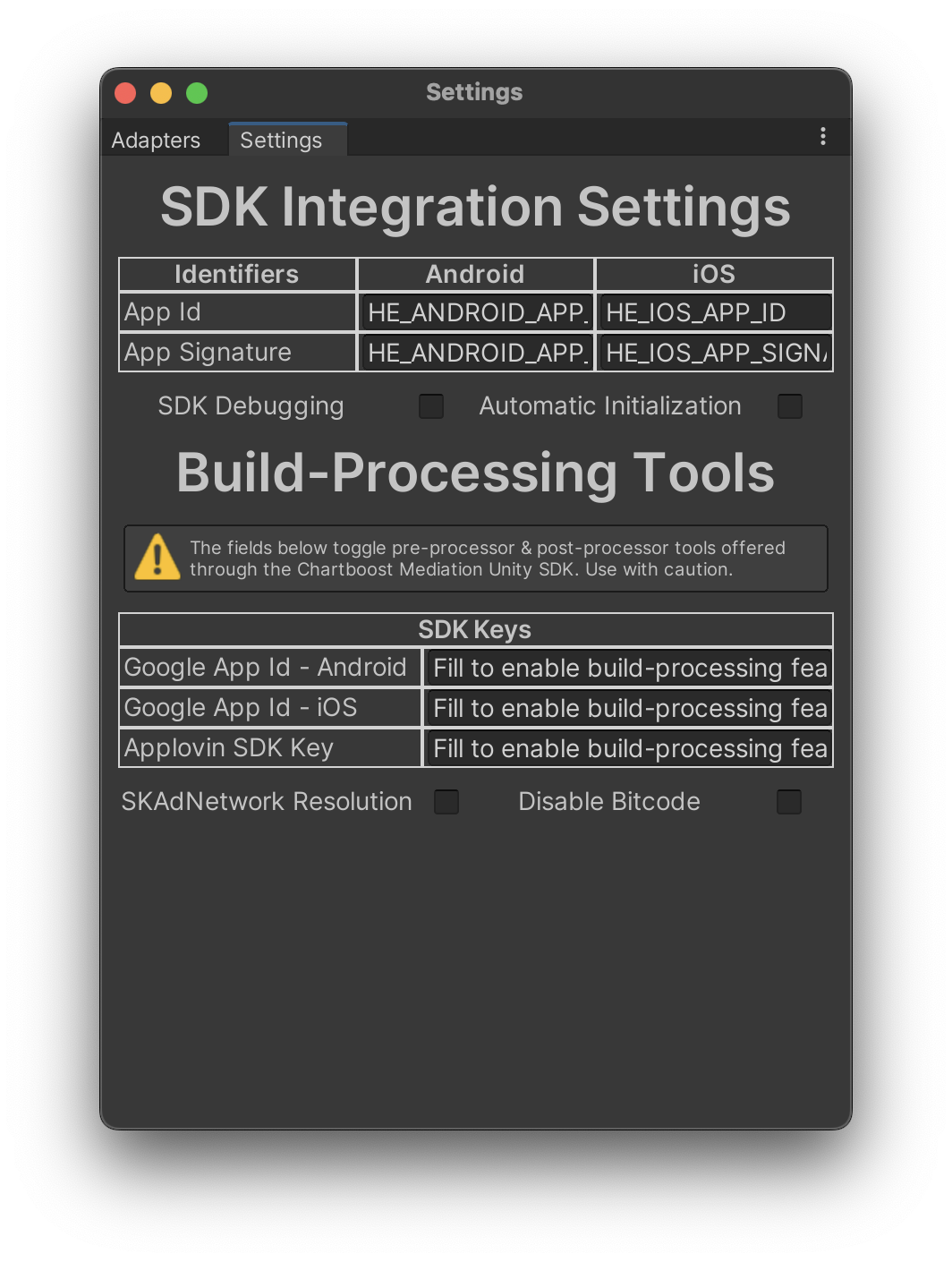
Note: Make sure the AppId and AppSignature values are obtained directly from your Chartboost Mediation platform as opposed to credentials from Chartboost or any other ad network
#### AppID & AppSignature
The Chartboost Mediation SDK `AppId` and `AppSignature` can be set in the Editor Window, or through the available C# API as seen below:
```csharp
// Android
ChartboostMediationSettings.AndroidAppId = "YOUR_APPID";
ChartboostMediationSettings.AndroidAppSignature = "YOUR_APPSIGNATURE";
// IOS
ChartboostMediationSettings.IOSAppId = "YOUR_APPID";
ChartboostMediationSettings.IOSAppSignature = "YOUR_APPSIGNATURE";
var activePlatformAppId = ChartboostMediationSettings.AppId;
var activePlatformAppSignature = ChartboostMediationSettings.AppSignature;
```
Note that these fields are required when calling `ChartboostMediation.StartWithOptions`. We provide this as an easy way to store and access such values.
#### SDK Debugging
To enable SDK debugging toggle the field on the `SettingsWindow` or use the provided C# API as seen below:
```csharp
// enabled
ChartboostMediationSettings.IsLoggingEnabled = true;
// disabled (default state)
ChartboostMediationSettings.IsLoggingEnabled = false;
```
#### Automatic Initialization
To enable Chartboost Mediation Unity SDK automatic SDK, toggle the field on the `SettingsWindow` or use the provided C# API as seen below:
```csharp
// enabled
ChartboostMediationSettings.IsAutomaticInitializationEnabled = true;
// disabled (default state)
ChartboostMediationSettings.IsAutomaticInitializationEnabled = false;
```
Note: When using automatic initialization, the network kill switch is disabled by default. You are required to set the AppId and AppSignature into the ChartboostMediationSettings scriptable object in order for this feature to work.
### Build-Processing Tools
Starting Chartboost Mediation Unity SDK 4.4.0, we have introduced a set of build pre-processor and post-processor tools to help you ensure your integration has all the required fields or modifications needed for proper partner functionality.
#### Google App Id
Caution: If you are implementing AdMob or GoogleBidding, you will need to use the tools provided below or create your approach to get the same result. Failing to include your Google App Id will result in crashes.
##### Android
The value provided in the Google App Id field will be utilized by the `ChartboostMediationPreprocessor` to modify your `AndroidManifest.xml` to ensure the `com.google.android.gms.ads.APPLICATION_ID` exists. If the element cannot be found, the preprocessor will add it.
To enable this feature, toggle the field on the `SettingsWindow` or use the provided C# API as seen below:
```csharp
ChartboostMediationSettings.AndroidGoogleAppId = "ca-app-pub-...YOUR_ID_HERE";
```
##### iOS
The value provided in the Google App Id field will be utilized by the `ChartboostMediationPostprocessor` to modify your XCode project's `Info.plist` to ensure the `GADApplicationIdentifier` exists. If the element cannot be found, then the postprocessor will add it.
To enable this feature, toggle the field on the `SettingsWindow` or use the provided C# API as seen below:
```csharp
ChartboostMediationSettings.IOSGoogleAppId = "ca-app-pub-...YOUR_ID_HERE";
```
#### AppLovin SDK Key
The value provided in the AppLovin SDK Key field will be utilized by the `ChartboostMediationPreprocessor` to modify your `AndroidManifest.xml` to ensure the `applovin.sdk.key` exists. If the element cannot be found, the preprocessor will add it.
To enable this feature, toggle the field on the `SettingsWindow` or use the provided C# API as seen below:
```csharp
ChartboostMediationSettings.AppLovinSDKKey = "YOUR_APPLOVIN_SDK_KEY";
```
#### SKAdNetwork Resolution
To add SKAdNetworks in your app, add the `SKAdNetworkIdentifier` and their values in your app's `Info.plist` file. This process can be manually controlled by you, however, after Chartboost Mediation 4.0.0, we have added a postprocessor to handle this process automatically if needed.
To enable this feature, toggle the field on the `SettingsWindow` or use the provided C# API as seen below:
```csharp
// enabled
ChartboostMediationSettings.IsSkAdNetworkResolutionEnabled = true;
// disabled (default state)
ChartboostMediationSettings.IsSkAdNetworkResolutionEnabled = false;
```
#### Disable Bitcode
Starting XCode 14, bitcode has been deprecated. For more information, visit [Apple's official documentation](https://developer.apple.com/documentation/xcode-release-notes/xcode-14-release-notes#Deprecations). We have included a setting to modify the `BITCODE_ENABLE` flag into your XCode project.
To enable this feature, toggle the field on the `SettingsWindow` or use the provided C# API as seen below:
```csharp
// enabled
ChartboostMediationSettings.DisableBitcode = true;
// disabled (default state)
ChartboostMediationSettings.DisableBitcode = false;
```
## Manual Initialization
If you want more control over when to initialize the Chartboost Mediation SDK, you can call the following on your `Awake` method.
Remember to add your Chartboost Mediation **App ID** and **App Signature**.
```csharp
// New Manual Initialization after 4.1.0
ChartboostMediation.StartWithOptions(ChartboostMediationSettings.AppId, ChartboostMediationSettings.AppSignature);
// Old Style of Manual Initialization Not Using ChartboostMediationSettings Scritable Object
var appId = "";
var appSignature = "";
#if UNITY_ANDROID
appId = "ANDROID_SAMPLE_APP_ID";
appSignature = "ANDROID_SAMPLE_APP_SIGNATURE";
#elif UNITY_IOS
appId = "IOS_SAMPLE_APP_ID";
appSignature = "IOS_SAMPLE_APP_SIGNATURE";
#endif
ChartboostMediation.StartWithOptions(appID, appSignature);
```
This will start the Chartboost Mediation Unity SDK. See [Delegate Usage](/en/mediation/integrate/unity/delegate-usage/) for more information.
Caution: Failing to remove default values will result in an error.
Once the Chartboost Mediation SDK has successfully started, you can start requesting ads.
## Network Kill Switch
The Chartboost Mediation Unity SDK initialization method has been expanded to take in optional initialization parameters. One of those parameters is a set of network adapter identifiers to skip initialization for the session.
```csharp
var options = new[]{"network_identifier", "network_identifier2"};
ChartboostMediation.StartWithOptions(ChartboostMediationSettings.AppId, ChartboostMediationSettings.AppSignature, options);
```
For more information on how to corroborate partner initialization data, see [Delegate Usage](/en/mediation/integrate/unity/delegate-usage/).
### Network Adapter Identifiers
| Network | Identifier |
|-----------------------------|-----------------------|
| AdMob | admob |
| Amazon Publisher Services | amazon_aps |
| AppLovin | applovin |
| BidMachine | bidmachine |
| Meta Audience Network | facebook |
| Digital Turbine Exchange | fyber |
| Google Bidding | google_googlebidding |
| InMobi | inmobi |
| IronSource | ironsource |
| Mintegral | mintegral |
| Pangle | pangle |
| Unity | unity |
| Vungle | vungle |
| MobileFuse | mobilefuse |
| Verve | verve |
| HyprMX | hyprmx |