# API Access & Overview
Note: In June 2024, Chartboost introduces API version 5. Support for version 4 will be sunsetting soon. Any new API endpoints will only be available for version 5 moving forwards.
The Chartboost API utilizes Restful API endpoints, providing developers programmatic access to manage their Chartboost resources for Monetization. Using this API you can get, create, update, or delete your app(s), ad location, and list management resources without having to access the Chartboost platform user interface.
To get started, review and accept the Chartboost App Disclosures on the [User Access Management](https://platform.chartboost.com/company/access-management) page in the [Chartboost platform](https://platform.chartboost.com/). Then review the access and authentication process detailed below before moving on to the specific APIs.
- [App Management API](/en/monetization/reference/app-management-api/)
- [Ad Locations API](/en/monetization/reference/ad-locations-api/)
- [Analytics API](/en/monetization/reference/analytics-api/)
- [List Management API](/en/monetization/reference/list-management-api/)
For Chartboost SDK developers, the following API references are available:
- [iOS SDK API Reference](https://reference.chartboost.com/monetization/ios/){:target="_blank"}
- [Android SDK API Reference](https://reference.chartboost.com/monetization/android/){:target="_blank"}
## API access URL endpoint
| Version 5 | Version 4 |
| ----------- | ----------- |
| | |
## Obtaining your API client credentials
The Chartboost API uses the OAuth2 standard protocol for “Client Credentials Grant” ([RFC ft-ietf-oauth-v2: The OAuth 2.0 Authorization Framework](https://datatracker.ietf.org/doc/html/rfc6749)) to grant authorization.
A client must pass a `client_id` and `client_secret` value to obtain an **access token** for authentication.
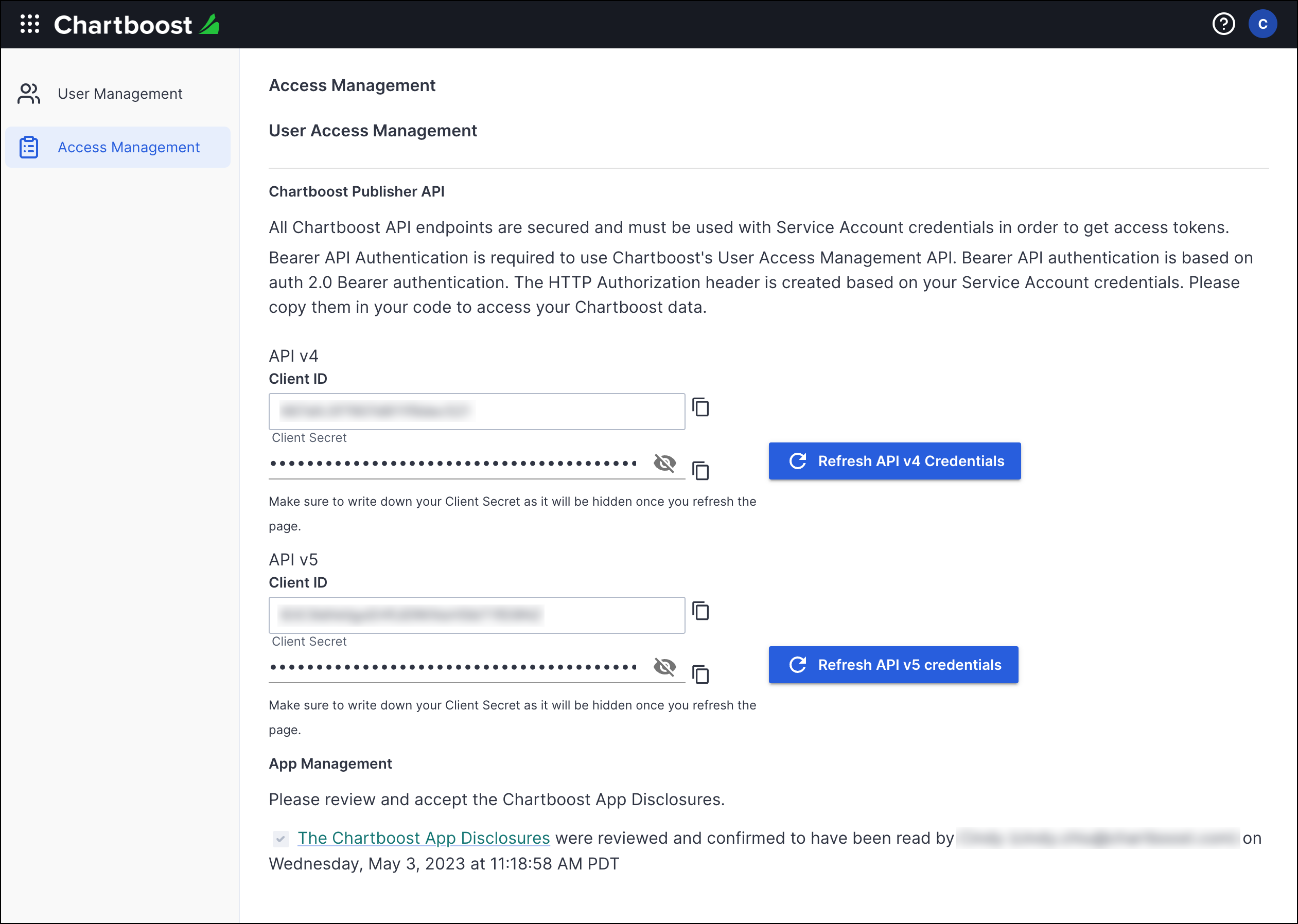
To find your client ID and client secret:
1. Log in to your [Chartboost platform](https://platform.chartboost.com){:target="_blank"}.
2. Click on your **user icon** at the top right corner.
3. Select **Company info & settings**.
4. Select **Access Management** from the left navigation column.
5. Click on **Refresh API v5 Credentials** to obtain new **client ID** and **client secret** credentials.
- For v4 users, click on **Refresh API v4 Credentials** to obtain your client ID and client secret credentials.
- The client secret key is only displayed when you refresh the credentials. You will not be able to see it again once you refresh or leave this page. If you loose your client secret key, you will have to re-authenticate with a new client ID and secret credentials.
## Authentication
An **access token** is required to access and make requests to the Chartboost public API server. Obtain your access token by passing in your client id and client secret credentials to the authentication server.
### Version 5 authentication
Endpoint POST /v5/oauth/token
URL https://api.chartboost.com/v5/oauth/token
Send a request to the OAuth2 token endpoint using your client ID and client secret credentials in the request body. ([Client Credentials Flow: Request tokens](https://auth0.com/docs/get-started/authentication-and-authorization-flow/client-credentials-flow/call-your-api-using-the-client-credentials-flow#request-tokens){:target="_blank"})
```text
POST /v5/oauth/token HTTP/1.1
Host: api.chartboost.com
Content-Type: application/json
{
"client_id": "YOUR_CLIENT_ID",
"client_secret": "YOUR_CLIENT_SECRET",
"audience": "https://public.api.gateway.chartboost.com",
"grant_type": "client_credentials"
}
```
The authorization server will validate and respond with an access token and expiration time in seconds; effective immediate. You must acquire a new access token after expiration, but you can use the same client credentials.
```text
HTTP/1.1 200 OK
Content-Type: application/json; charset=UTF-8
Cache-Control: no-store
Pragma: no-cache
{
"access_token":"2YotnFZFEjr1zCsicMWpAA",
"token_type":"Bearer",
"expires_in":86400,
"scope":"apps:adv:get sa:new apps:crea:new comp:get..."
}
```
### Version 4 authentication
Endpoint POST /v4/token
URL https://api.chartboost.com/v4/token
Send a request to the token endpoint ([RFC 6749 - Section 4.4.2. Access Token Request](https://datatracker.ietf.org/doc/html/rfc6749#section-4.4.2){:target="_blank"}) with your client ID and client secret credentials in the request body ([RFC 6749 - Section 2.3.1. Client Password](https://datatracker.ietf.org/doc/html/rfc6749#section-2.3.1){:target="_blank"}). Encode them using the HTTP Basic authentication scheme base64(client_id:client_secret).
```text
POST /v4/token HTTP/1.1
Host: api.chartboost.com
Authorization: Basic czZCaGRSa3F0MzpnWDFmQmF0M2JW
Content-Type: application/x-www-form-urlencoded
grant_type=client_credentials
```
The server will then respond with an access token and expiration time in seconds; effective immediate ([RFC 6749 - Section 4.4.3. Access Token Response](https://datatracker.ietf.org/doc/html/rfc6749#section-4.4.3){:target="_blank"}). You must acquire a new access token after expiration, but you can use the same client credentials.
```text
HTTP/1.1 200 OK
Content-Type: application/json; charset=UTF-8
Cache-Control: no-store
Pragma: no-cache
{
"access_token":"2YotnFZFEjr1zCsicMWpAA",
"token_type":"Bearer",
"expires_in":3600
}
```
## Using the public API
After authenticating against the Public API, every subsequent call must use the obtained Access Token to grant access to the protected resources. To do so, the client must use the Authorization Header with the “Bearer” token (as described in [RFC ft-ietf-oauth-v2-bearer: The OAuth 2.0 Authorization Framework: Bearer Token Usage](https://datatracker.ietf.org/doc/html/rfc6750)). Client call example:
**Version 5 header example**
```text
GET /v5/apps HTTP/1.1
Host: api.chartboost.com
Authorization: Bearer 2YotnFZFEjr1zCsicMWpAA
```
**Version 4 header example**
```text
GET /v4/apps HTTP/1.1
Host: api.chartboost.com
Authorization: Bearer 2YotnFZFEjr1zCsicMWpAA
```
## Troubleshooting authentication errors
Any issue with the authentication will produce an error from the list below (as described in [RFC 6749 - Section 5.2. Error Response](https://datatracker.ietf.org/doc/html/rfc6749#section-5.2)):
| Parameter | Response |
| :--------------------- | :-------------------------------------------------------------------------------------------------------------------------------------------------------------------------------------------------------------------------------------------------------------------------------------------------------------------------------------------------------------------------------------------------------------------------------------------------------------------------------------------------------------------------------------------------------------- |
| `error` | **REQUIRED**. A single ASCII [USASCII] error code. Values for the "error" parameter MUST NOT include characters outside the set %x20-21 / %x23-5B / %x5D-7E. |
| `error_description` | **OPTIONAL**. Human-readable ASCII [USASCII] text providing additional information, used to assist the client developer in understanding the error that occurred. Values for the "error_description" parameter MUST NOT include characters outside the set %x20-21 / %x23-5B / %x5D-7E. |
| `error_uri` | **OPTIONAL**. A URI identifying a human-readable web page with information about the error, used to provide the client developer with additional information about the error. Values for the "error_uri" parameter MUST conform to the URI-reference syntax and thus MUST NOT include characters outside the set %x21 / %x23-5B / %x5D-7E. |
| `invalid_request` | The request is missing a required parameter, includes an unsupported parameter value (other than grant type), repeats a parameter, includes multiple credentials, utilizes more than one mechanism for authenticating the client, or is otherwise malformed. |
| `invalid_client` | Client authentication failed (e.g., unknown client, no client authentication included, or unsupported authentication method). The authorization server MAY return an HTTP 401 (Unauthorized) status code to indicate which HTTP authentication schemes are supported. If the client attempted to authenticate via the "Authorization" request header field, the authorization server MUST respond with an HTTP 401 (Unauthorized) status code and include the "WWW-Authenticate" response header field matching the authentication scheme used by the client. |
| `invalid_grant` | The provided authorization grant (e.g., authorization code, resource owner credentials) or refresh token is invalid, expired, revoked, does not match the redirection URI used in the authorization request, or was issued to another client. |
| `unauthorized_client` | The authenticated client is not authorized to use this authorization grant type. |
| `unsupported_grant_type` | The authorization grant type is not supported by the authorization server. |
| `invalid_scope` | The requested scope is invalid, unknown, malformed, or exceeds the scope granted by the resource owner. |
```text
HTTP/1.1 400 Bad Request
Content-Type: application/json; charset=UTF-8
Cache-Control: no-store
Pragma: no-cache
{
"error":"invalid_request"
}
```