# Integration
## Consent Management Platform
The Core SDK requires a Consent Management Platform (CMP) to manage the current consent state of the user and to provide consent change notifications.
Chartboost supports the following CMP providers with open source CMP adapters for the Core SDK.
#### Google User Messaging Platform
| **Open source CMP adapter** | [https://github.com/ChartBoost/chartboost-core-ios-consent-adapter-google-user-messaging-platform](https://github.com/ChartBoost/chartboost-core-ios-consent-adapter-google-user-messaging-platform){:target="_blank"} |
To include the Google User Messaging Platform adapter into your iOS project, add the following to your Podfile.
```swift
pod 'ChartboostCoreConsentAdapterGoogleUserMessagingPlatform'
```
#### Usercentrics
| **Open source CMP adapter** | [https://github.com/ChartBoost/chartboost-core-ios-consent-adapter-usercentrics](https://github.com/ChartBoost/chartboost-core-ios-consent-adapter-usercentrics){:target="_blank"} |
When setting up your Usercentrics account, it is required to use a TCF2 configuration so Usercentrics provides consent info as a TCF string, which is used by most advertising partners. The CCPA configuration is also encouraged. You can achieve a hybrid setup with these and other configurations by using Usercentrics geolocation rulesets.
For more info refer to [Usercentrics account setup](https://usercentrics.com/docs/config/account-config/){:target="_blank"} and [Usercentrics user guide to account interface](https://docs.usercentrics.com/?_gl=1*ozduci*_ga*MjY5OTU0NjguMTcyMDQ1OTMxMg..*_ga_2QB41H1S1Q*MTcyMDU0Njk1MC4yLjEuMTcyMDU0NzEwMy4yOS4wLjA.#/account-interface?id=create-new-configurations){:target="_blank"} docs.
To include the Usercentrics adapter into your iOS project, add the following to your Podfile.
```swift
pod 'ChartboostCoreConsentAdapterUsercentrics'
```
### Integrating Consent Management Platform
The `ConsentManagementPlatform` is the entry point for integrating your CMP via CMP mediation. There are two ways of integrating consent depending upon your app’s use case.
Note that some CMPs do not support the Publisher Handled Consent use case. The table below shows which CMPs are able to perform the following use cases.
| Consent Management Platform | CMP Handled Dialog (Concise) | CMP Handled Dialog (Detailed) | Publisher Handled Dialog |
|--------------------------------|------------------------------|-------------------------------|--------------------------|
| Google User Messaging Platform | ✅ | ✅ | ❌ |
| Usercentrics | ✅ | ✅ | ✅ |
#### CMP Handled Consent Dialog
This is the most straightforward use case where you simply want to use the consent dialog that your CMP provides. In the event that your CMP provides no consent dialog, no consent dialog will be shown.
Concise dialogs are the standard user-facing consent dialogs that are typical of the web world. Detailed consent dialogs are much more verbose and typically allows users to pick and choose each individual item they are consenting to.
As a general rule of thumb, use the concise dialogs for the initial user presentation of the consent dialog, and use the detailed consent dialog for users wishing to make modifications to their consent.
```swift
import AppTrackingTransparency
import ChartboostCoreSDK
// Function ot obtain App Tracking Transparency authorization status
func obtainATTAuthorization(completion: @escaping (ATTrackingManager.AuthorizationStatus) -> Void) {
if ATTrackingManager.trackingAuthorizationStatus == .notDetermined {
ATTrackingManager.requestTrackingAuthorization { status in
completion(status)
}
} else {
completion(ATTrackingManager.trackingAuthorizationStatus)
}
}
// Concise dialog example
// This function is expected to be called at some point during app startup to gather consent from the user.
func showConciseConsentDialogIfNeeded() {
// Obtain ATT authorization first
obtainATTAuthorization { status in
guard status == .authorized else {
print("Skipping consent dialog. ATT authorization status is \(status).")
return
}
// Show concise dialog only if needed
if ChartboostCore.consent.shouldCollectConsent {
ChartboostCore.consent.showConsentDialog(.concise, from: self) { presented in
print("Consent dialog presented.")
}
}
}
}
// Detailed dialog example
// This function is expected to be called as result of some user interaction where the intention is to review or modify some consent options previously set.
func showDetailedConsentDialog() {
// Show detailed dialog
ChartboostCore.consent.showConsentDialog(.detailed, from: self) { presented in
print("Consent dialog presented.")
}
}
```
#### Publisher Handled Consent Dialog
For advanced Publishers who wish to manage the consent dialog themselves, the following examples demonstrate how to use `ConsentManagementPlatform` to set the user’s consent programmatically.
```swift
import ChartboostCoreSDK
// Show concise dialog only if needed
if ChartboostCore.consent.shouldCollectConsent {
// Display custom consent dialog implemented by the publisher
displayCustomPublisherConsentDialog() { consented in
// Apply new consent value to the CMP
if consented {
ChartboostCore.consent.grantConsent(source: .developer)
} else {
ChartboostCore.consent.denyConsent(source: .developer)
}
}
}
```
### Unsupported CMPs
If you are using a CMP that Chartboost Core doesn't support, a custom CMP adapter module must be created. This has the benefits of being able to swap out CMPs easily and allows for a high degree of customization for your specific consent workflow. Additionally, a custom CMP adapter can be reused across multiple apps, cutting down on maintenance and improving quality.
See [Creating a Module](/en/mediation/integrate/core/ios/creating-a-module/) to set up a custom CMP adapter module.
### Per-Partner Consent
For advanced use cases, it may be desirable to specify consent on a per-Mediation partner basis. In lieu of specifying per-partner consent, the global consent of the CMP is used. Per-partner consent values take precedence over the global consent.
Not all CMPs support per-partner consent. The table below lists per-partner consent compatibility.
Per-partner consent is usually available via the detailed consent dialog. These consent signals will be sent to the Mediation partner adapters and applied in higher priority over the global consent settings.
| Consent Management Platform | Per-Partner Consent Supported? |
|------------------------------|--------------------------------|
| Google UMP | ❌ |
| Usercentrics | ✅ |
## Initializing Core with Modules
The Core SDK and all specified modules will be initialized when `ChartboostCore.initializeSDK()` is called.
By default, the following module initializations will automatically be attempted without the Publisher needing to explicitly specify the module name when calling `ChartboostCore.initializeSDK()`.
| Module |
| -------------------- |
| Chartboost Mediation |
### Initialization Flow
Once `ChartboostCore.initializeSDK()` has been called, the Core SDK initialization flow is as follows:
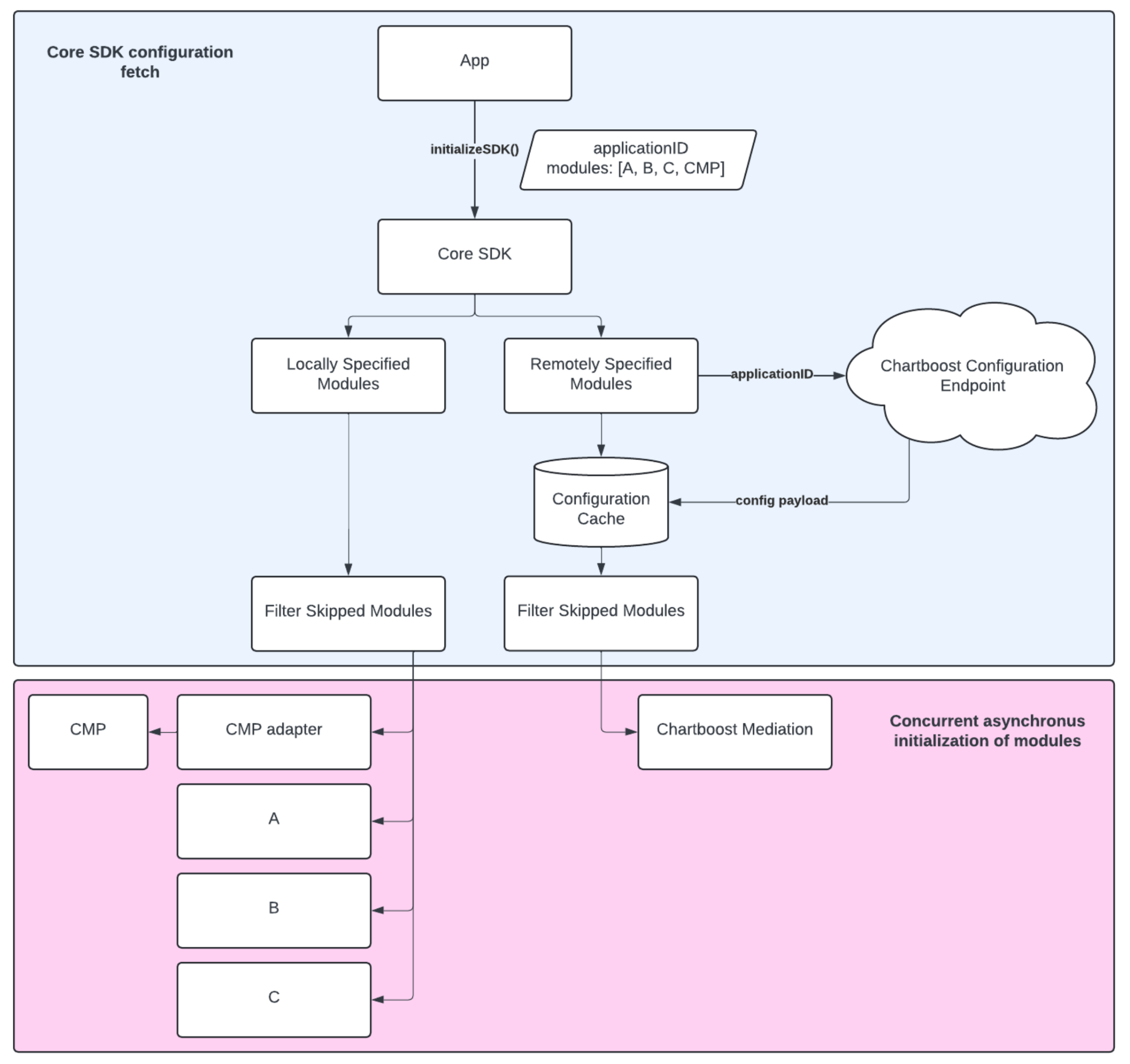
Core SDK Initialization flow can be broken down into two concurrent processes: locally specified modules and remotely specified modules.
Locally specified modules are modules that are explicitly specified by the Publisher in the `SDKConfiguration` object passed into the `ChartboostCore.initializeSDK()` call. These modules will be initialized immediately and do not wait for the configuration endpoint response.
Remotely specified modules are modules that are specified by the configuration endpoint. On a fresh install, these modules won’t be initialized until the configuration endpoint has given back a response. For subsequent launches when a cached configuration is available, the cached configuration will be used to initialize the modules it knows about to speed up initialization as much as possible.
### Advanced Features
#### Skipping Specific Modules
Sometimes it is desirable to skip the initialization of certain modules. This may be due to employing multipart module initialization, or disabling a module due to performance issues or crashing.
To skip specific modules, populate the `skippedModuleIDs` property of the `SDKConfiguration` object that is passed into the `ChartboostCore.initializeSDK()` call.
See [Initialization Examples](#initialization-examples) for more information.
#### Multipart Module Initialization
The Core SDK supports multipart module initialization. This is an advanced use case where a Publisher wants to fully control what modules are initialized at various points in their app’s launch lifecycle. This allows for modules critical to app functionality to initialize first, and then some time later, initialize the non-essential or nice to have modules in a subsequent `ChartboostCore.initializeSDK()` call.
For example, a Publisher may wish to initialize an analytics module only at app launch, and then initialize the mediation module after a game’s assets have finished loading.
See [Initialization Examples](#initialization-examples) for more information.
### Handling Module Initialization Callbacks
When initializing modules, you have the option of getting notified when a module completes its initialization. To do so, pass in an instance conforming to `ModuleObserver` into the `ChartboostCore.initializeSDK()` call.
Note that initializing an already-initialized module may trigger duplicate notifications to this observer, and initializing an initializing module will be a no-op.
A `ModuleInitializationResult` is given back once the module’s initialization is complete. The result contains various metrics pertaining to that particular module initialization attempt as well as the instance of the module itself.
### CMP Adapter Initialization
CMP adapters are considered to be modules by the Core SDK. While it is not explicitly necessary to initialize the Core SDK with a CMP module, failure to do so will have the following effects:
1. Downstream modules reliant upon consent information will not have any available and will assume that they are operating in an unconsented environment.
2. Calls made to `ConsentManagementPlatform` will be no-op as there is no CMP to forward the calls to.
**In the event that more than one CMP adapter is specified for initialization, the first one will be used.**
The Core SDK currently does not support multiple initialized instances of CMPs. If your consent use case requires the usage of multiple CMPs at the same time, it is recommended that you create a custom CMP adapter to achieve your use case.
See [Creating a Module](/en/mediation/integrate/core/ios/creating-a-module/) for more information.
### Module Initialization Errors and Exceptions
While the `ChartboostCore.initializeSDK()` call can accept a nil value for the `moduleObserver` parameter, it is highly recommended to provide an observer to receive module initialization callbacks. This will allow you to handle any errors or exceptions that may occur during a module’s initialization, and be notified when a module is ready for use.
### Initialization Examples
#### Normal
Normal initialization workflow examples prioritizing simplicity of integration.
The following code snippets demonstrate:
1. Creating a CMP module that will be used as the source of truth for consent changes and values.
2. Initializing Chartboost Core and the CMP module
3. Subscribing to the initialization completion callback
```swift
import ChartboostCoreSDK
// Create CMP module
let cmpModule = UsercentricsAdapter(
options: UsercentricsOptions(settingsId: ""),
partnerIDMap: [:] // map of usercentrics to chartboost partner IDs, if the publisher wants to allow users to provide granular consent to specific mediation partners
)
// Initialize Core with CMP module
ChartboostCore.initializeSDK(
configuration: .init(
chartboostAppID: "",
modules: [cmpModule]
),
moduleObserver: self
)
// Delegate method to receive module initialization updates
func onModuleInitializationCompleted(_ result: ModuleInitializationResult) {
if let error = result.error {
print("Module \(result.moduleID) initialized with error: \(error)")
} else {
print("Module \(result.moduleID) initialized with success")
}
}
```
#### Advanced
Advanced initialization workflow examples for the [advanced features](#advanced-features).
The following code snippets demonstrate:
1. Creating a CMP module that will be used as the source of truth for consent changes and values.
2. Creating a custom module to be initialized first.
3. Initializing Chartboost Core, the CMP module, and the custom module, but skipping the automatic initialization of the Chartboost Mediation module.
4. Subscribing to the initialization completion callback.
5. Waiting a predefined set of time to simulate performing other work related to the app.
6. Initializing Chartboost Core again with the Chartboost Mediation module.
```swift
import ChartboostCoreSDK
import ChartboostMediationSDK
// Create CMP module and custom module
let cmpModule = GoogleUserMessagingPlatformAdapter()
let customModule = CustomPublisherModule()
// Initialize Core with CMP and custom modules, skipping the Mediation module
ChartboostCore.initializeSDK(
configuration: .init(
chartboostAppID: "",
modules: [cmpModule, customModule],
skippedModuleIDs: [ChartboostMediation.coreModuleID]
),
moduleObserver: self
)
// Perform app logic (simulated with a wait with an arbitrary time interval)
DispatchQueue.main.asyncAfter(deadline: .now() + 5) {
// Initialize Core again allowing the Mediation module to initialize
ChartboostCore.initializeSDK(
configuration: .init(
chartboostAppID: ""
),
moduleObserver: self
)
}
// Delegate method to receive module initialization updates
func onModuleInitializationCompleted(_ result: ModuleInitializationResult) {
if let error = result.error {
print("Module \(result.moduleID) initialized with error: \(error)")
} else {
print("Module \(result.moduleID) initialized with success")
}
}
```
## Setting Publisher Metadata
Publishers may optionally set additional information that may be used by any of the modules within the ecosystem to enhance their performance or supplement consent.
The following examples demonstrate setting each of the Publisher metadata fields.
```swift
ChartboostCore.publisherMetadata.setFramework(name: "Unity", version: "2022.12345.12345")
ChartboostCore.publisherMetadata.setIsUserUnderage(true)
ChartboostCore.publisherMetadata.setPlayerID("player_12345")
ChartboostCore.publisherMetadata.setPublisherAppID("app_id_12345")
ChartboostCore.publisherMetadata.setPublisherSessionID("session_12345")
```