# Device Identifiers
Chartboost identifiers explained: expected formats, use, and support.
## Identifier for Advertising
IFA is also referred to as IDFA. They are the same thing.
|Sent in the field|Format|Platform|Supported by|
|--|--|--|--|
|`ifa`|{::nomarkdown}- Hexadecimal representation of the IFA data from the device
- Dashes are not inserted
- 32 characters long
{:/}|iOS|{::nomarkdown}- All Chartboost iOS SDKs
- Callbacks
- Server-to-Server integration
{:/}|
### How Do I Get My IFA?
1. Link **AdSupport.framework** (Build Phases -> Link Binary With Libraries)
2. Add these lines of code to an app and run it on an iOS device you'll see the IFA printed in the log:
```
// Import these
#import
#import
// Print IFA (Identifier for Advertising) in Output section. Add to applicationDidBecomeActive. iOS 6+ devices only. NSString* ifa = [[[NSClassFromString(@"ASIdentifierManager") sharedManager] advertisingIdentifier] UUIDString];ifa = [[ifa stringByReplacingOccurrencesOfString:@"-" withString:@""] lowercaseString];NSLog(@"IFA: %@",ifa);
```
Alternatively, you may be able to find your device IFA by using a third-party app called [The Identifiers](https://itunes.apple.com/us/app/the-identifiers/id564618183?mt=8).
**Does the use of the Chartboost SDK comply with Apple's IDFA policies?**The Chartboost SDK respects the **Limit Ad Tracking** setting and Apple's limitations on the usage of IDFA to:
1. Serve advertisements within an app
2. Attribute an app installation to a previously served advertisement
3. Attribute an action taken within an app to a previously served advertisement
Please continue using the Chartboost SDK with confidence, and for any questions or concerns, [contact us](/en/support/contact-us/).
## Google Advertising ID (GAID)
|Sent in the field|Format|Platform|Supported by|
|--|--|--|--|
|`gaid`|{::nomarkdown}- 32 characters, plus 4 dashes (e.g.
e4fe9bde-caa0-47b6-908d-ffba3fa184f2) - Lower-case letters and numbers
{:/}|Android|{::nomarkdown}- All Chartboost Android SDKs
- Server-to-Server integration
- Callbacks
{:/}|
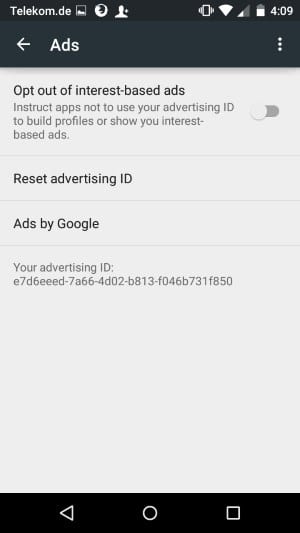
### How do I get my GAID?
- On your Android device, open the **Google Settings** app.
- Select **Ads**.
- Your advertising ID appears at the bottom.
## UDID
|Sent in the field|Format|Platform|Supported by|
|--|--|--|--|
|`uuid`|{::nomarkdown}- Should not be hashed or manipulated in any way
- 36 characters long
{:/}|iOS Only|{::nomarkdown}- Server-to-Server integration
- Callbacks
{:/}|